
Storage
Where your magic items, boosters and packs are kept.
Everything you've earned but haven't used yet is kept in your Storage. Open it any time with /storage.
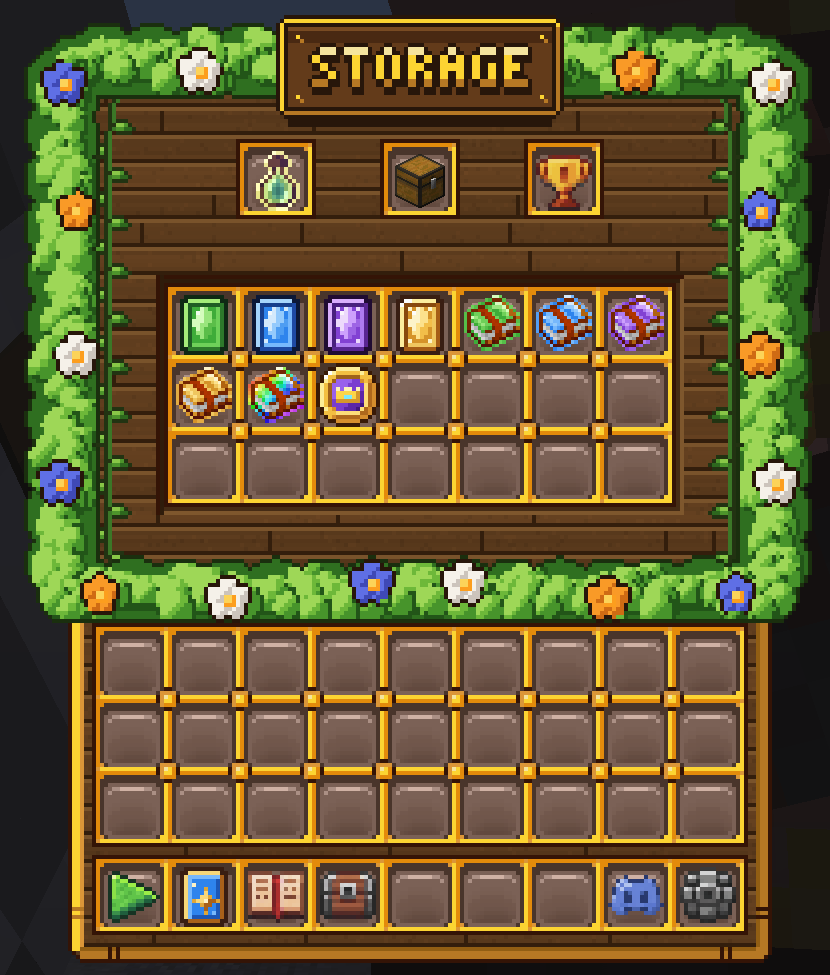
Magic Items
Your magic items are stored here. Hover any of them to see how many you own:
- Wild Cards (Common, Rare, Epic and Legendary): exchange for any card of that rarity.
- Upgrade Books: give you all the cards needed to upgrade one card of that rarity. A Book of Cards works on any rarity.
- Royal Coins: cover all the coins needed for one card upgrade.
Use them from a card's Upgrade Card menu: right-click the card in /decks or /collections. See the Card Upgrades guide.
Earning Magic Items
Milestone Rewards, the Battle Pass and Match Rewards are all good ways to get magic items. Click the milestones trophy at the top of Storage, or use /milestones, to see your progress toward the three milestone categories. Open the Battle Pass with /battlepass.
Boosters
Your boosters are kept in Booster Storage. Open it by clicking the potion at the top of Storage, or with /boosters. See the Boosters guide.
Packs
Your card packs and Arena Boxes are kept in Pack Storage. Open it by clicking the chest at the top of Storage, or with /packs. See the Packs guide.
